Legacy Documentation Automation
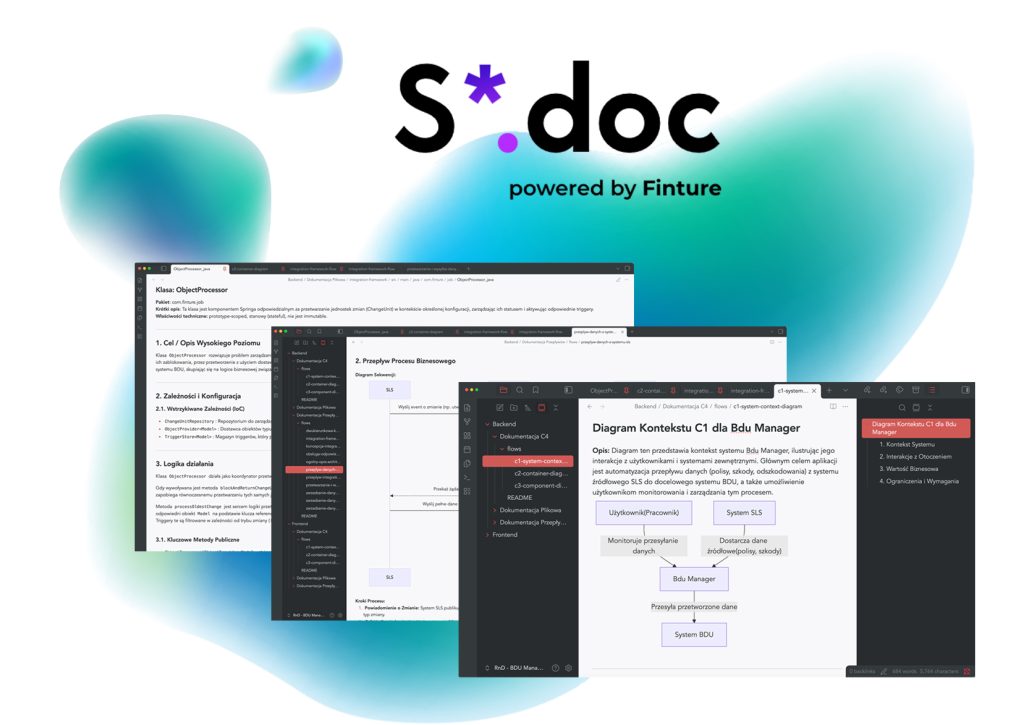
S*.doc documents your legacy system. You focus on the business
S*.doc documents your legacy system. You focus on the business
Automated documentation of code, C4 architecture and business processes – deployed on your infrastructure and compliant with enterprise requirements.
- Java
- C#
- TypeScript
- C++
Technology debt
Every company has a system
that nobody really understands anymore
Every company has a system that nobody really understands anymore
Legacy systems have been built up over many years. Documentation – if it exists at all – is out of date, scattered, or resides solely in the minds of a few key employees. When they leave, that knowledge goes with them.


Four symptoms you’ll recognise:
01
A new developer needs months to become productive in a complex system.
02
Architectural documentation exists only on paper – or does not exist at all.
03
04
Non-technical stakeholders – product owners, analysts, and managers – must involve developers in every question about the system instead of finding the answers themselves.
58 %
According to research, that is how much time programmers spend reading and understanding code – rather than writing it
AI Documentation Automation
Documentation that creates itself
S*.doc is a proprietary solution from the AI Documentation Automation suite that first analyses your system and then generates multi-level documentation – automatically, in full accordance with your structure and requirements.
It consists of two main components that work together:
Documentary
AI agents that read the code for you
AI agents analyse the source code in depth and, based on this, generate documentation at three levels of detail, tailored to different audiences.
- AI agents
- source code
- 3 levels
Knowledge Assistant
A RAG bot integrated directly into Microsoft Teams, enabling the team to ask questions in real time and receive answers based on both the generated documentation and the source code.
- RAG
- Microsoft Teams
- immediate replies
360° knowledge gevernance
Three levels of documentation. One system
Documentation tailored to the recipient – whether they are a developer, an architect or the management team.
Automatic generation of Java/C# documentation
Code documentation
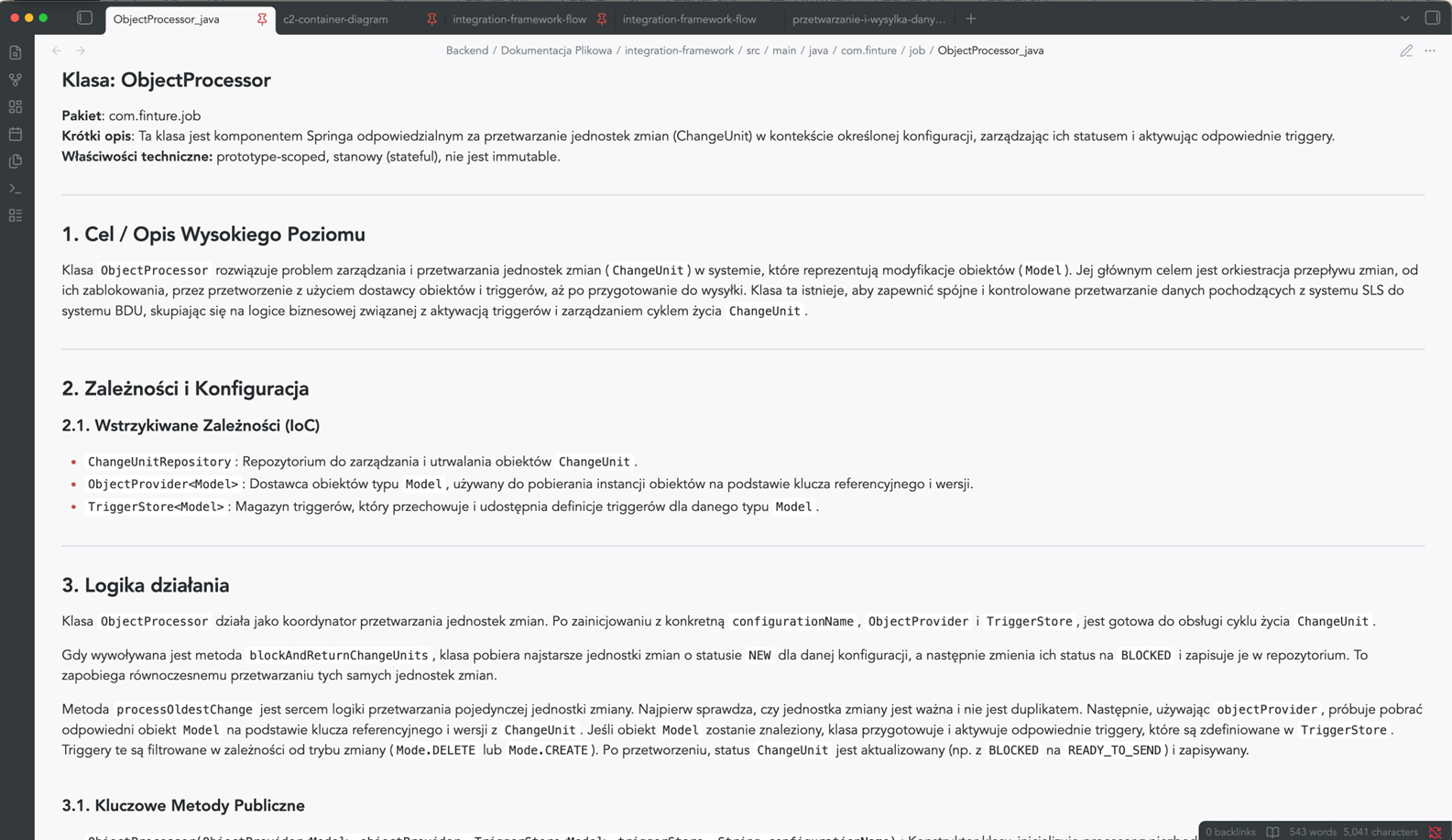
Generated automatically, taking into account the specific features of the programming language – Java, C#, TypeScript, C++. It divides the content into logical sections, omits irrelevant elements and allows you to tailor the type of documentation to the audience: technical for developers or simplified for end users.
- A clear, structured description of each module
- Automatic skipping of boilerplate and generated code
- The ability to generate a report on compliance with safety guidelines or a report on technological optimisation
Architectural visualisation of C4 & Mermaid
Architectural documentation in accordance with the C4 model
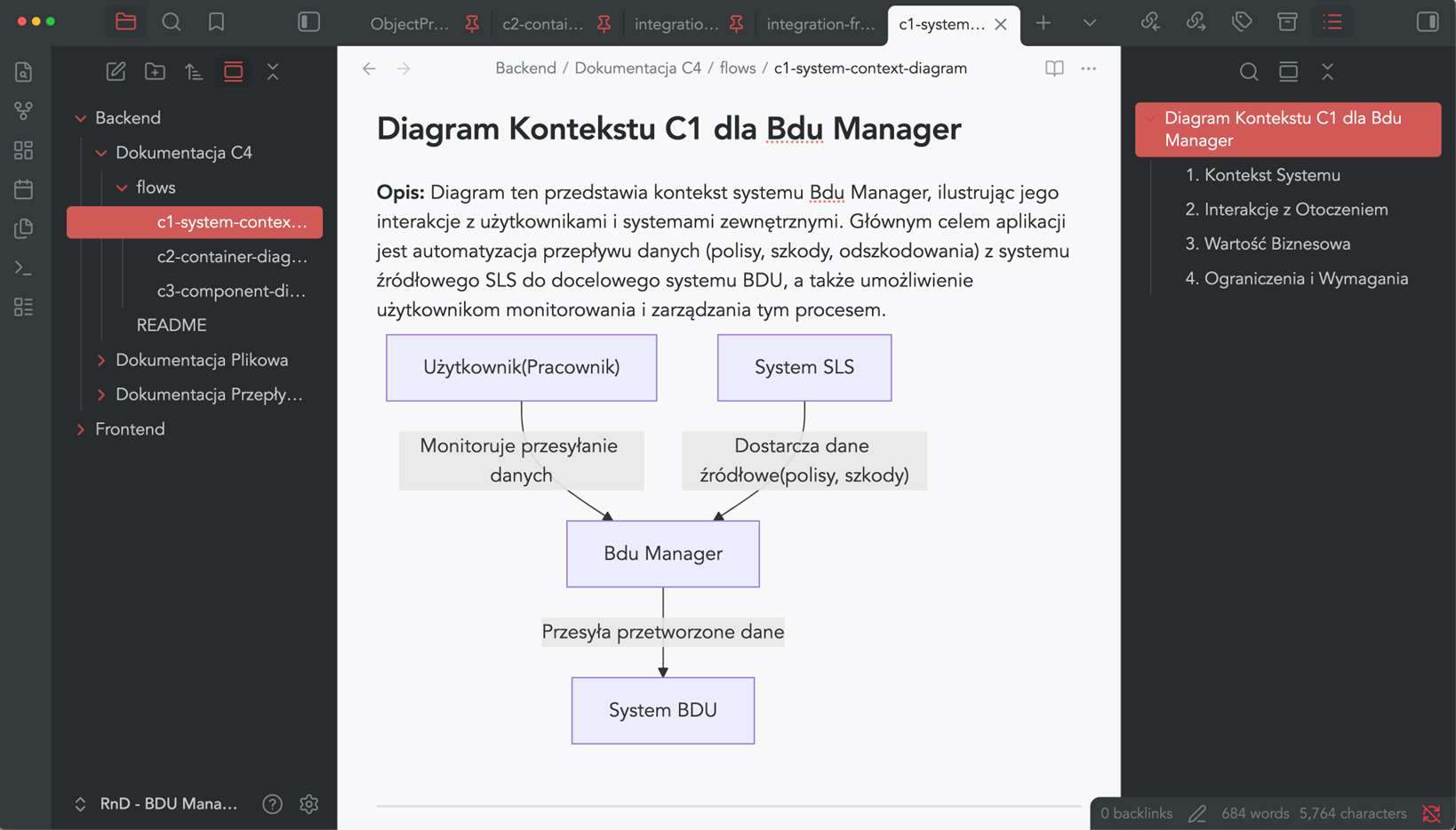
S*.doc automatically generates Mermaid diagrams for the context, container and component views – in accordance with the widely recognised C4 model.
So, no more manually drawing diagrams that become outdated after the first sprint.
- Consistent visual representation of the architecture at various levels of detail
- A clear presentation for the board, auditors and new team members
Business Process Mapping (BPM)
Business process documentation
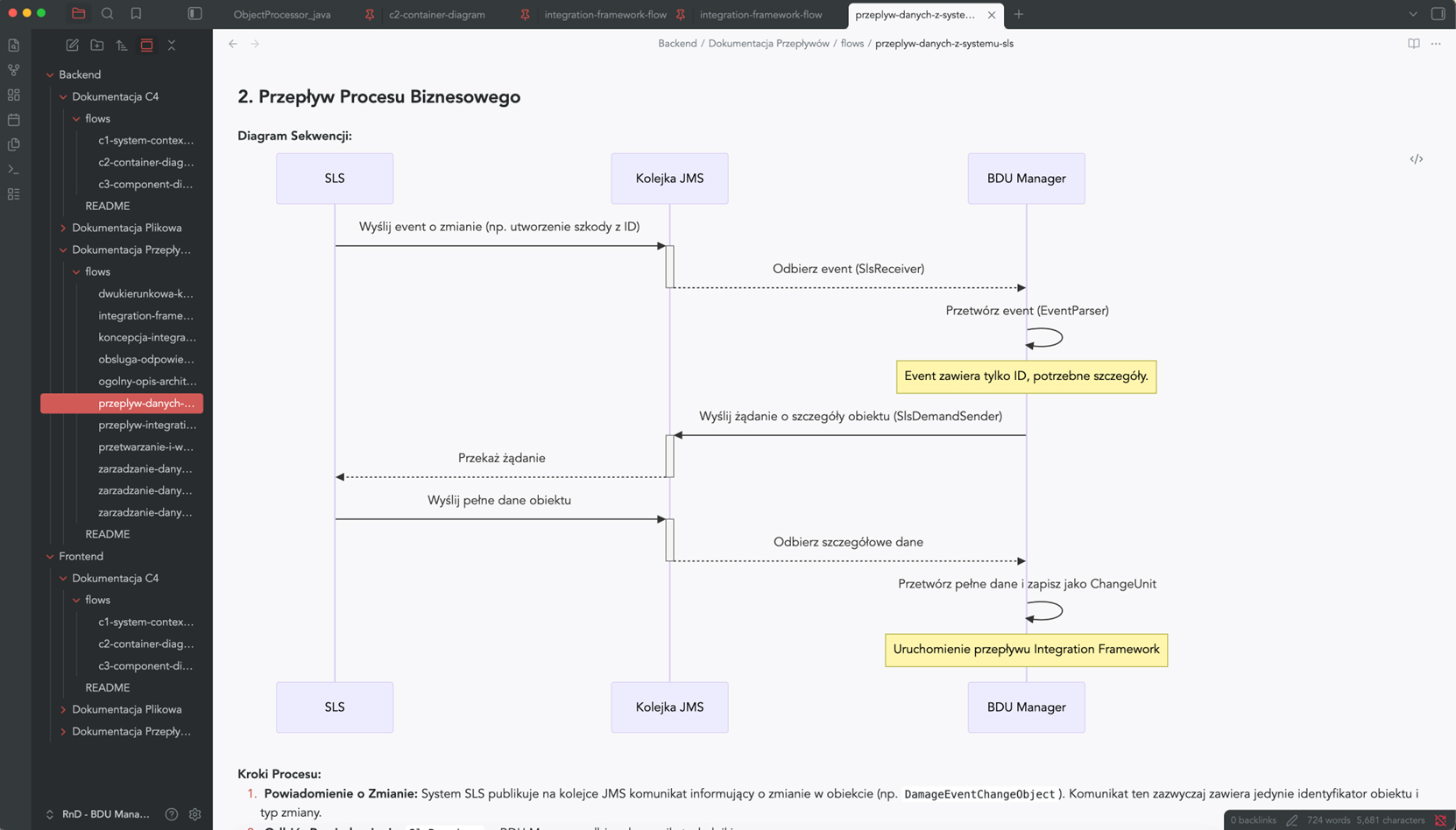
S*.doc models the flows within the system and how its components interact – process steps, interdependencies between components, and data exchange points.
Instead of asking, “How does it work with other things?” – you can check it out in 30 seconds.
- Visualisation of user journeys and communication between services
- A description of the internal logic in language that is understandable to both business and technical staff
- Support for retrospective code reviews and dependency analysis
AI-Driven RAG
Knowledge assistant – the entire system
in a single question
Knowledge assistant – the entire system in a single question
The result: a bot available in Microsoft Teams that provides precise answers to the team’s questions – without having to search Confluence or wait for a senior developer.
Sample questions:
- How does the authorisation module work in the X system?
- Which services communicate with the payment database?
- Where in the code is the transaction limit exceeded exception handled?
S
S*.doc Assistant
Microsoft Teams · online
How does the authorisation module work?
14:32
The authorization module (AuthorizationModule.java) handles JWT authentication and session management. It implements OAuth 2.0 with RBAC. Keys are rotated every 24 hours by KeyRotationService.
14:32
Which services communicate with it?
14:33
The authorization module (AuthorizationModule.java) handles JWT authentication and session management. It implements OAuth 2.0 with RBAC. Keys are rotated every 24 hours by KeyRotationService.
14:33
Adaptive System Architecture
Adapted to your system. Not the other way around
S*.doc can be customised and configured to meet the specific needs of an organisation.
Dimensions
Features
Technology
- Java
- C#
- TypeScript
- C++
Type of documentation
- Technical
- Architectural
- Business
Special reports
- Compliance with safety regulations
- Retrospective Code Review
- Technological optimisation
Level of detail
Tailored to the audience –
- board
- developer
- auditor
Operational efficiency audit
How much is it costing you
to have no documentation?
That’s not a rhetorical question.
3-6 months
Onboarding a developer into a complex legacy system takes an average of 3‑6 months
- Onboarding period
Bus factor
The departure of a key employee with unstructured information poses a real operational risk
- Operational risk
Audit costs
Security and compliance audits carried out without up-to-date documentation result in additional costs and delays
- Compliance and audits
S*.doc shortens onboarding time, reduces dependency on individual knowledge, and delivers documentation that is always up to date – because it is generated automatically.
For whom
S*.doc works anywhere system complexity outpaces documentation
S*.doc works
anywhere system complexity outpaces documentation
Finance sector
Transaction systems, payment platforms, legacy core banking: comprehensive documentation for audits, regulatory compliance (KNF, DORA) and business continuity
Insurance
Rapid onboarding in environments with high staff turnover and systems that have been integrated over many years
Telecommunications
Telecom operators with billing and CRM systems developed over many years
Industry and manufacturing
Manufacturers using MES or SCADA systems, or their own production planning solutions
Logistics
Logistics operators with parcel tracking and fleet management systems
Retail
Large retail chains with their own warehouse management systems, ERP systems or e-commerce platforms
Financial-Grade Security
Designed with security and enterprise infrastructure in mind
Your data stays with you. Always
S*.doc runs in a Kubernetes or Docker environment – on the customer’s infrastructure, not in the provider’s cloud. The source data never leaves your environment.
Local LLM models are the foundation of S*.doc, giving banks full control over their data. The solution meets the highest security standards, as confirmed by deployments in highly regulated environments.
Component
Details
Deployment
Kubernetes with a central orchestrator and a set of AI agents
Dostęp do kodu
XXX
LLM models
Bifrost proxy layer – support for cloud and on-premises models
Interface
Web-based panel for configuring, viewing and downloading documentation
On-premises installation
On-premises deployment – on your Kubernetes infrastructure
Local LLM models
Support for local LLM models – the source code remains within the environment
Banking standards
Configuration compliant with security and network communication policies for banking environments
The GitLab ecosystem
Integration with GitLab without exporting data to external services
4 steps to documentation
Implementation in four steps.
No hassle, no months of setup
Deployment in four steps. No chaos, no months of configuration
S*.doc is deployed directly within the client’s infrastructure, with full customisation to meet the requirements of the environment – including banking regulations and network security policies.
Phase I – Implementation and configuration of the environment
- Preparing the environment and deploying the solution within the client’s infrastructure
- Adapting the configuration to the requirements of the environment – including security policies and network communication
- Configuring access to code repositories, workspaces and system components
- Configuration of the selected LLM model, whether local or remote
- Deployment of components and verification of correct operation
Stage II – Configuration and parameterisation
Before the developers start analysing the code, we agree together on what the documentation should look like and who it is intended for.
- Flows – development of customised generation workflows for selected areas of the system
- Documentation structure – level of detail, types of materials generated, division into sections
- Code analysys – adapting the analysis method to the project architecture and system logic
- Generation settings – prompts, templates, agent logic and content grouping rules tailored to the specific requirements of the project
Stage III – Creation and organisation of documentation
At this stage, the system goes live. The agents analyse the code, generate documentation and compare the options – so that they can choose the one that works best for your system.
Scope of work
- A comparison of the quality of different LLM models on code samples
- Testing different prompt variations for quality and consistency of results
- Organising the documentation into logical sections
- Selecting the optimal generation option
Result:
Stage IV – Testing and optimisation
Before going into production, the documentation undergoes a comprehensive quality assessment. We don’t just deliver something that ‘looks good’ – we check that it actually works.
- Assessment of the consistency, completeness and usefulness of the generated materials
- Technical verification based on the source code and project knowledge
- Assessing the level of detail required for different target audiences – developers, architects, and management
- Optimisation of configurations, prompts and model selection based on test results
- Preparation and handover of the solution for production use
FAQ
Frequently asked questions
Answers to the questions we hear most often –
before and after implementation.
Answers to the questions we hear most often – before and after implementation.
Was the documentation generated entirely using AI?
Yes, the documentation was generated entirely by AI; however, we operate on a ‘human-in-the-loop’ model, which means that the final product is checked by our experts.
After the first generation, do you carry out a manual review to check the accuracy from various angles?
Yes. It is one of the elements of our process.
Which LLM models do you use?
Do mistakes happen?
The multi-agent approach significantly reduces the risk of discrepancies. A dedicated agent verifies the documentation once it has been generated and produces a report for the operator, who then double-checks all the comments raised.
Is the documentation created from scratch or built up incrementally?
At present, the solution is designed for creating documentation from scratch, but we are working to ensure that it will also support an incremental approach in the future.
Which database do you use?
Free consultation
Don’t make a decision about legacy system,
which you don’t quite understand
S*doc dostarcza dokumentację Twojemu zespołowi – zanim rotacja, audyt lub projekt modernizacji odsłonią białe plamy. Skontaktuj się z nami i sprawdź, co możemy zrobić z Twoim systemem.
The administrator of the data entered into the form is Finture sp. z o.o. Personal data will be processed for the purpose of establishing contact and providing answers to questions. More information about the rights and principles of data processing is available in the Privacy Policy.